
Key takeaways:
- Effortless Collaboration: Learn how to invite a partner or roommate to your budget in under two minutes using a secure connection token.
- Granular Privacy Control: You decide exactly which budgets to share and which to keep private—and you can revoke access at any moment.
- Real-Time Syncing: Discover how the person who invites the other stays in the loop with instant notifications every time a linked user adds a transaction.
- The Power of Accountability: Understand why shared financial goals lead to better spending habits and less "money stress" in relationships.
- Seamless Switching: See how co-users can flip between their own personal accounts and shared budgets with a single login.
Let’s face it: budgeting alone can sometimes feel like trying to clap with one hand. Sure, you can do it, but it’s a lot louder and more effective when you have a partner.
Whether you are saving for a dream vacation with your spouse, managing household expenses with a roommate, or teaching a teenager financial responsibility, transparency is key. That’s why we are thrilled to introduce the Budget Together feature on PocFin.
This premium feature turns budgeting from a solo struggle into a shared success story.
Why Budget Together?
Before we dive into the "how," let’s talk about the "why." Money is often cited as a top stressor in relationships, but it doesn't have to be.
Accountability: It’s harder to buy that impulse item when you know someone else is watching the goal tracker.
Shared Responsibility: No more "I thought you paid the electric bill."
Real-time Alignment: Stop waiting for the end of the month to see where the money went.
If you are just getting started and need help laying the groundwork, check out our guide on Building a realistic budget for the real world.
How It Works: Simple & Secure Setup
We’ve made sharing your finances as easy as sending an email, without sacrificing security. Here is how you can set up your financial squad in PocFin:
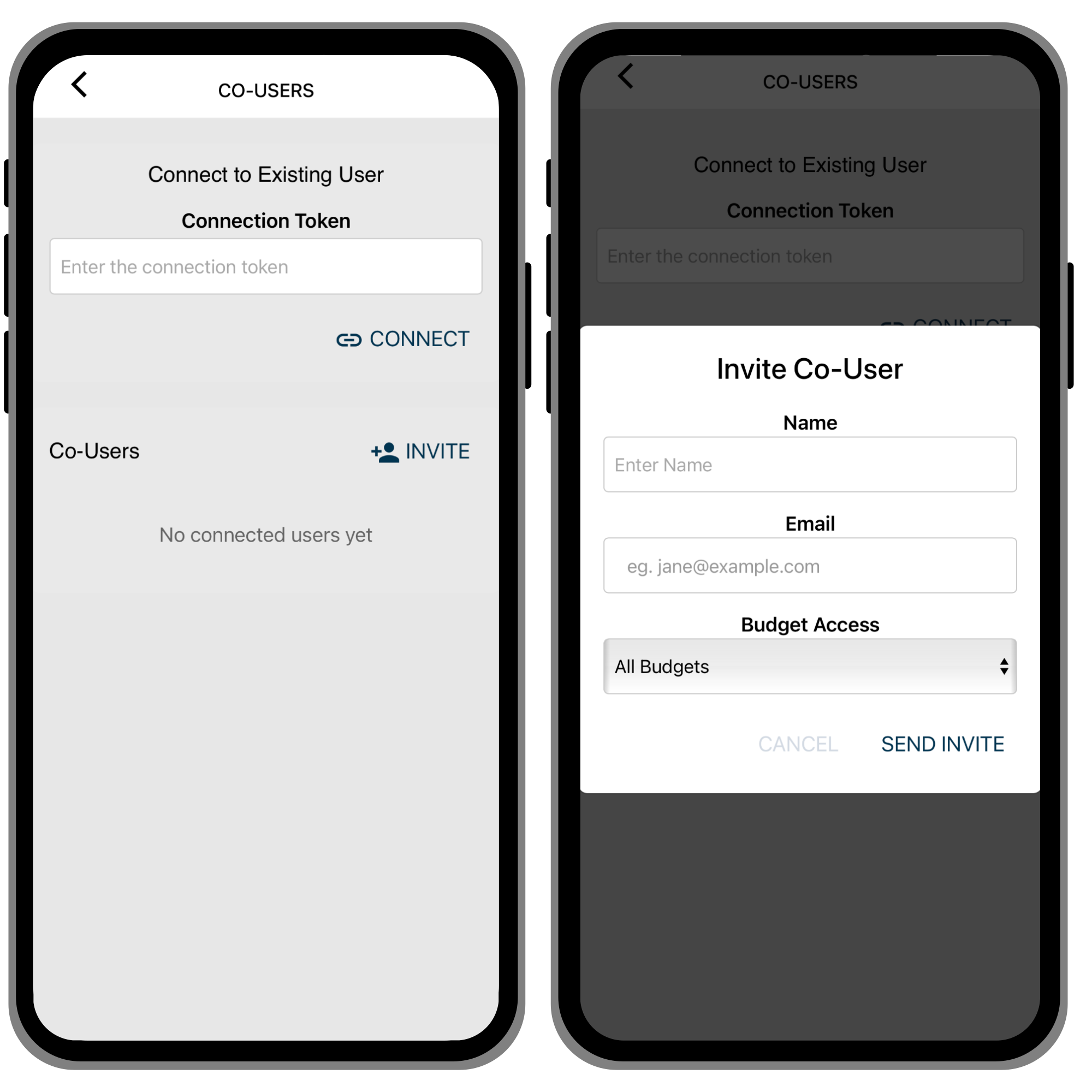
Send the Invite: In the app's left side menu, select co-users (premium users only), and simply enter the name and email of the person you want to invite.
Select Access: You choose exactly which active budgets you want them to see. You remain in full control.
The Magic Token: Your invitee will receive an email with a unique connection token.
Connect: They log into PocFin, go to the Co-users page (in the left side menu), and paste the token into the "Connect Token" box.
One Login, Multiple Views
Once connected, the experience is seamless. When your co-user logs in, they will have the option to sign in to their own personal account or to view your account.
Don't worry - they will only see the specific budgets you granted them access to. If your financial situation changes, you can revoke or adjust their access at any time.
Stay in the Loop (Literally)
Sharing a budget doesn't mean you have to constantly text each other updates. We’ve automated the communication.
The Notification: Whenever your linked user adds a transaction, you will receive a notification. This keeps you in the loop instantly without needing to nag or refresh the page. It is the perfect way to see How PocFin's budgeting system works in real-time action.
Ready to Team Up?
Budgeting is a journey, and it’s always better with company. By using Budget Together, you are building a system of trust and clarity.
For more tips budgeting, read our article on How to create a budget you will actually stick to.
Log in to PocFin today, invite your partner, and start winning with money together.
Cheers,
The PocFin Team
Sign in to join the conversation.